
NCCIA Complaint Guide: Official Route and Evidence Checklist
Find the official NCCIA complaint route, distinguish it from PKCERT incident reporting and prepare a factual record without exposing more private information.
For a personal cybercrime complaint in Pakistan, start with the National Cyber Crime Investigation Agency, NCCIA, and its official complaint channel. Do not confuse an individual's fraud or harassment complaint with a technical incident report intended for an organization's networks and systems.
This guide helps you organize a factual account, preserve useful records and avoid exposing more private information while seeking help. It does not submit a complaint on your behalf, guarantee recovery of money or predict the outcome of an investigation.
What is NCCIA and which official link should you check?
The indexed government complaint page identifies NCCIA as the National Cyber Crime Investigation Agency under the Ministry of Interior and Narcotics Control. Its official complaint address is https://complaint.nccia.gov.pk/. Use the exact government domain rather than a search advertisement or a message offering to file a case for a fee.
The agency's indexed FAQ also points to that complaint address. Direct retrieval of the NCCIA pages returned an access restriction during this article's source check, so we have not claimed to test the live form or verify every current field.
If the portal is inaccessible on your device, check the agency's official website for current contact and office information. Do not enter identity documents into a copycat page merely because it promises a faster alternative.
How is NCCIA different from PKCERT's incident-report form?
PKCERT's official reporting page draws the distinction explicitly. Its form covers cybersecurity incidents affecting organizations, networks, systems and critical infrastructure. It directs individuals with complaints such as online fraud, financial scams, harassment, blackmail or fake social accounts to NCCIA's appropriate channels.
This matters because two forms can both concern cybersecurity while serving different purposes. A person reporting an impersonation account should not assume that a technical incident-response form automatically starts a criminal complaint process.
Likewise, an organization dealing with a compromised network may need technical incident-response coordination as well as other appropriate reporting. This guide does not decide all reporting duties for every organization. Use the authority's stated scope and obtain professional guidance where your situation requires it.
What should you write before opening a complaint form?
Prepare a short factual chronology. State what happened, when you noticed it, which account or service was involved and what you did afterwards. Keep observed facts separate from assumptions about who was responsible.
For an original fictional example, “At 10:15 I received a message from this displayed account, and at 10:20 I made the transaction recorded in my receipt” describes a sequence. “The sender must be my neighbour because the message sounded familiar” is an inference that needs evidence.
Use clear dates and include a time zone if it matters. If you do not know an exact time, say it is approximate. Inventing precision makes a record look tidy while reducing its reliability.
Which records can help explain what happened?
Organize records you already have lawful access to: the relevant message, account identifier, page address, transaction reference or confirmation. Preserve the surrounding context needed to understand each item instead of keeping only an isolated sentence.
Create a private index so you can find the material again. A useful record list might look like this:
| Record | What to note |
|---|---|
| Message | Sender identifier, date and relevant context |
| Account or page | Exact visible address or identifier |
| Payment record | Reference, amount and date as shown |
| Screenshot | What it shows and when you captured it |
| Your actions | Changes or reports you made afterwards |
This is a preparation checklist, not a statement that NCCIA requires exactly these fields in every case. Follow the current official instructions for the actual submission.
Do not break into an account, impersonate someone or confront a suspect to obtain more material. Report what you can establish from your own records and let the appropriate authority assess the situation.
Should you edit screenshots before reporting?
Keep an unaltered private original where practical. If you make a redacted copy for public discussion, label it as redacted and do not replace the original with that version. The version suitable for a public question may be different from the material an authorized investigator needs through an official channel.
Avoid adding accusatory captions inside the image. Put your explanation in a separate note so that the record and your interpretation remain distinguishable. Do not rearrange a conversation in a way that changes its apparent sequence.
When you are unsure how to supply sensitive evidence, ask the official channel for instructions. Do not post private or intimate material publicly to prove that an incident occurred. A public comment thread is not an evidence-submission system.
What if you entered a password into a suspicious page?
NIST's phishing guidance recommends changing affected passwords and replacing reused passwords on other accounts with unique ones. It also recommends multi-factor authentication. Reach the real service through a known address or its official app, rather than following the suspicious message again to “fix” the account.
If financial access may be affected, contact the relevant bank or payment provider through a verified channel promptly. This is separate from preparing a complaint. This article cannot freeze an account, reverse a transaction or guarantee reimbursement.
Keep a note of the protective actions you took and when. That helps you explain the sequence without relying on memory later. Do not delay necessary account protection merely to make a screenshot look unchanged.
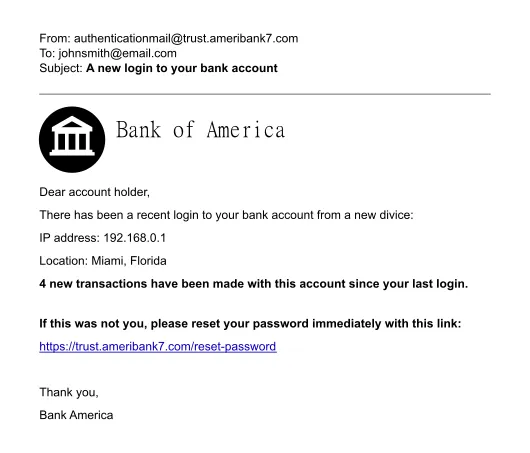
A deliberately fictional phishing example. It is not an NCCIA message, a real complaint or a reader’s account.
How can you recognize a fake support or recovery offer?
Be cautious when someone promises guaranteed recovery, immediate arrest or removal of all online material in exchange for a password, OTP or advance payment. A familiar logo and an urgent message do not establish the sender's authority.
Verify contact information independently. NIST advises checking a suspicious request through known contact details or the organization's public website, rather than using the information supplied in the message itself. The same principle helps when a purported investigator or support agent contacts you unexpectedly.
Never test a suspicious link by entering real credentials. You can describe the message and retain its address without interacting further with the sender. If your workplace is involved, follow its incident-reporting process and tell the appropriate person what happened.
What does the phishing example in this article demonstrate?
The accompanying email illustration is deliberately fictional. It demonstrates the kind of message that imitates a trusted organization and asks the recipient to act. It is not a screenshot of an NCCIA communication, a real complaint or an actual reader's bank account.
When examining a suspicious message, ask three questions: what is it asking me to do, where would that action take me and how can I verify the request independently? These questions focus on the action and destination rather than judging safety only by spelling or visual polish.
For a student activity, discuss the fictional example without clicking any link or supplying information. Write a safe next step using a known official contact route. The aim is to practise recognition and reporting, not to interact with a scammer.
How should you describe a financial loss?
Use the amount, currency, date and transaction reference from the actual record. Distinguish a completed payment from a request for payment, an attempted transaction or a figure someone merely threatened to demand.
If several transactions are involved, list them separately before adding a total. A clear table helps prevent an amount from being counted twice. Mark any estimate as an estimate and preserve the source for each confirmed figure.
Do not publish full account or card details in an appeal for help. Supply sensitive information only through the legitimate process to the appropriate recipient. This website does not collect cybercrime evidence or act as an intermediary for recovering funds.
What should you keep after submitting a report?
Retain any acknowledgement or reference the official system provides, the submission date and a copy of what you supplied. Use the authority's own status wording when asking about progress, rather than assuming that every acknowledgement means the same stage of action.
This guide does not claim a fixed response time, automatic FIR registration or a guaranteed investigation result. Those outcomes cannot be established by a general article. Follow current instructions from the responsible authority for any next step.
If you make a correction or provide additional material, keep it clearly linked to the existing report where the process allows. A private chronological record helps you avoid contradicting yourself accidentally or losing track of which information was supplied when.
How can students and families reduce future risk?
Discuss how to verify unexpected requests before a problem occurs. Agree that asking a trusted person for help after a suspicious message is sensible, not something to hide. A calm response can make it easier for someone to explain what happened accurately.
Use unique passwords, enable appropriate multi-factor authentication and keep account-recovery information under your control. These measures reduce risk; they do not make every account or user immune to deception.
For broader information-checking practice, see our AI study guide. A plausible answer and a plausible-looking message both deserve scrutiny of the evidence and requested action.
Where should you start now?
Use the official NCCIA complaint channel for the personal cybercrime matters described above, and check PKCERT's stated scope if the issue concerns an organization's technical systems. Prepare the facts, protect sensitive records and avoid treating a private recovery offer as an official reporting route.
If there is an immediate threat to physical safety, do not rely on a web form as an emergency response. Seek appropriate local emergency assistance. For legal questions or case-specific decisions, obtain advice from an appropriately qualified professional.
Sources
Source 1: official NCCIA complaint portal
Source 3: PKCERT reporting scope
Source 4: phishing prevention and response guidance
Checked 1 November 2026. NCCIA links were identified through indexed official pages, but direct retrieval returned an access restriction. No complaint was submitted and no response-time, recovery or legal-outcome guarantee is made.
Image credits: cover: Top left: PremeditatedTop right: Tom PageBottom left and right: Maurizio Pesce, source, CC BY 2.0. Resized and converted to WebP. inline: Original template by User:Isochrone, amended by User:Belbury, source, CC BY 4.0. Resized and converted to WebP.
Found an error or an outdated detail? Report a correction with the article URL and original source.